What callers hear when Standby acts.
Standby can cap a queue or close it, for a set time. It never edits your contact flows. Your flows decide what a caller hears; Standby only decides which branch of them the caller takes.
So it's worth checking two branches before you need them at two in the morning. Both are standard Amazon Connect behavior, and both are branches most contact centers already have.
Capping a queue
What changes: the queue's Maximum contacts in queue.
Where new callers go: the At capacity branch of your Transfer to queue block. Everyone already waiting keeps their place and is answered as normal. The cap only affects callers arriving after it's set.
Check that:
- The At capacity branch is connected. If it's left open, the caller is disconnected.
- It leads somewhere a caller can act on: an apology and a callback offer, your hours, a voicemail, or an overflow queue.
Four ways to handle a full queue
Whatever you connect to the At capacity branch is what new callers get while the cap is on. These are four common choices, each built from standard Amazon Connect blocks. The outlined branch is the one a cap sends callers down.
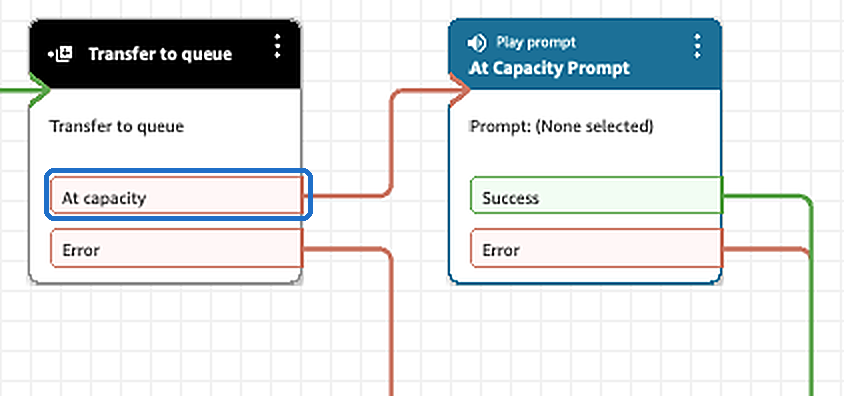
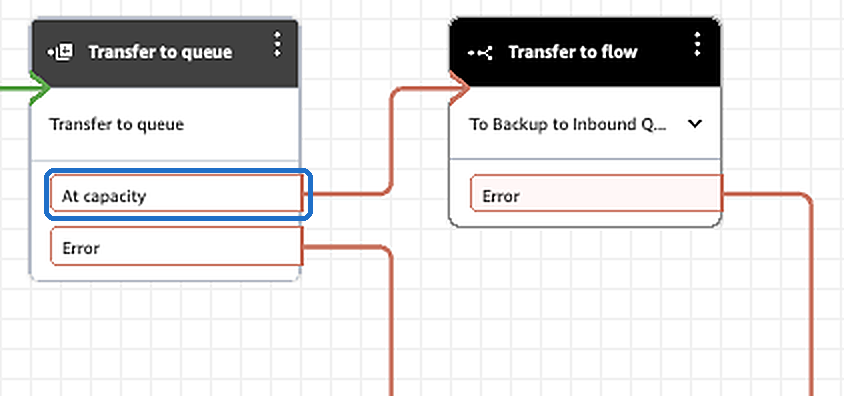
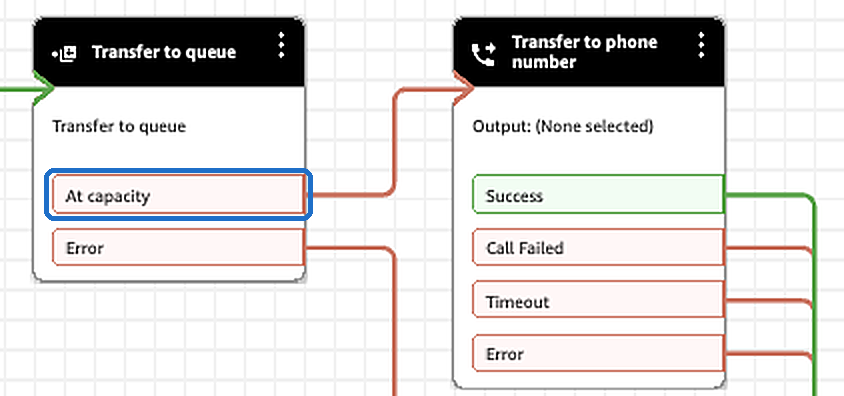
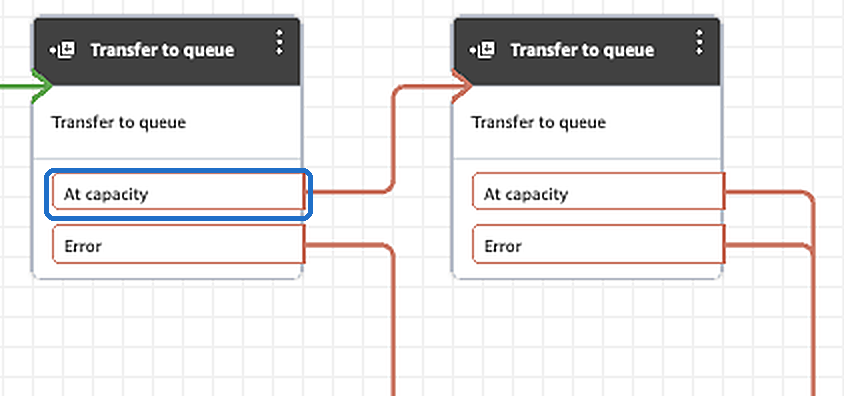
Three things that surprise people. These are how Amazon Connect works, whoever sets the cap.
- Enforcement lags a little. In a burst, a few callers can get in above the cap.
- Callbacks and transfers into the queue can exceed the cap by up to 20%.
- A queue that has never had a cap is limited only by your instance's quota, so its At capacity branch has probably never run. Test it rather than assume it.
If callers only ever reach a queue through a callback transfer, capping it has no effect: that kind of transfer has no At capacity branch. Cap the queue callers arrive in.
Closing a queue
What changes: the queue's hours of operation. Standby points the queue at a closed schedule your Standby stack created, and points it back when the time runs out.
Where new callers go: the Out of hours branch of your Check hours of operation block.
The one thing that has to be true: the Check hours of operation block must not name its own hours. When the block names hours, it uses those and ignores the queue's, so closing the queue would change nothing for callers.
Check that:
- The block has no hours set on it, so it uses the queue's.
- Callers pass through it before Transfer to queue.
- The Out of hours branch plays something useful. Most contact centers already have a closed message here.
- Any holiday or override branch on the block doesn't skip Out of hours. If it does, it skips a Standby closure too.
Standby can't read your flows, by design (see Security). So the close action stays hidden in the app until an administrator confirms this.
About a minute to take effect
Amazon Connect caches queue settings where calls are routed. We measured 55 to 60 seconds for a change to reach callers, whether it's applied or undone. The app shows that on screen rather than saying "done" the moment Connect accepts the change.
Every change undoes itself
Each cap or closure has an expiry. When it's reached, Standby puts back the previous cap or the previous hours, usually within a minute. Allow the usual minute more for callers to notice.
Before putting anything back, Standby reads the queue again. If someone has changed it in the meantime, Standby leaves it alone and tells you, rather than overwriting a change it didn't make.
Try it before you need it
Once, on a test queue, during business hours:
- In the Amazon Connect console, set the queue's Maximum contacts in queue to 0.
- Wait a minute and call in. You should hear your At capacity branch.
- Set the queue's hours of operation to a schedule with no open hours.
- Wait a minute and call in. You should hear your Out of hours branch.
- Put both settings back.
If either call went somewhere unexpected, that branch is worth fixing whether or not you use Standby. It's what callers get every time a queue fills up or your hours roll over.
Sources
The Amazon Connect behavior above is from AWS's documentation: Transfer to queue, maximum contacts in a queue, routing on queue capacity and Check hours of operation. The one-minute figure is ours, measured on a live instance.