Amazon Connect queue capacity, explained
By Contact-IQ · October 2026
Every Amazon Connect queue can hold a limited number of contacts. Most contact centers never set that limit, which means the branch that handles a full queue has often never run. Here's how capacity works, what callers hear when a queue is full, and how to make sure it's something sensible.
The setting: Maximum contacts in queue
In the Amazon Connect console, each queue has Maximum contacts in queue. Once that many contacts are waiting, the queue is at capacity and stops accepting new ones. Everyone already waiting keeps their place and is answered as normal; only callers arriving after the limit is reached are affected.
A queue with no maximum set is limited only by your instance's quota, which in practice it will never hit.
Where new callers go: the At capacity branch
When a contact flow's Transfer to queue block tries to add a caller to a full queue, the caller goes down that block's At capacity branch instead.
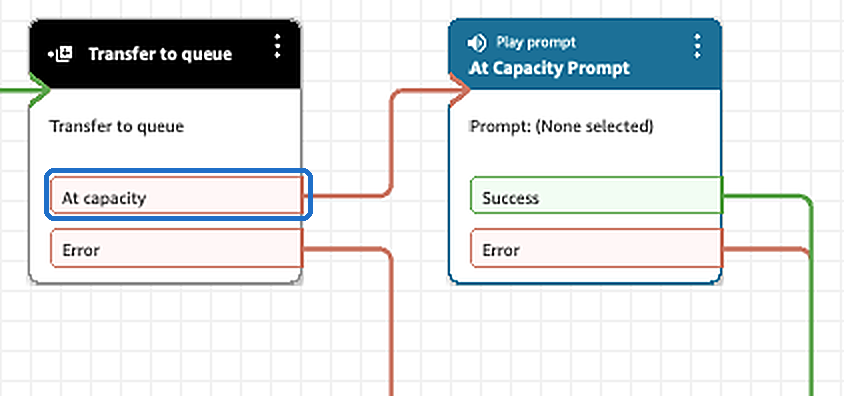
If the At capacity branch isn't connected, the caller is disconnected. Check this one first.
Four ways to handle a full queue
Whatever you connect to the At capacity branch is what callers get while the queue is full. Four common choices, all built from standard blocks:
- Play a message. Tell callers you're busy and when to try again, or point them to your website.
- Hand to a backup flow. A flow built for busy times, one that offers a callback or takes a voicemail.
- Send to another number. An answering service, another site, or a mobile on call.
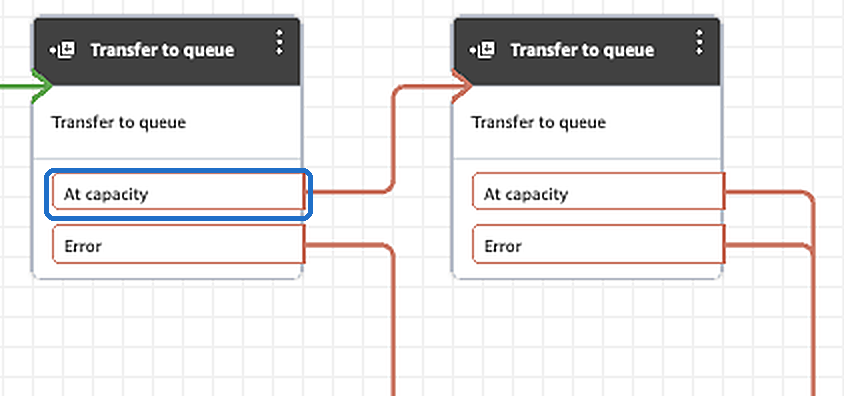
- Overflow to another queue. A second team takes the extra calls. Give that queue's own At capacity branch somewhere to go too.
Three things that surprise people
These are how Amazon Connect behaves, whoever sets the limit:
- Enforcement lags a little. In a burst, a few callers can get in above the limit.
- Callbacks and transfers into the queue can exceed it by up to 20%.
- Callback-only queues don't have the branch. If callers only reach a queue through a callback transfer, capping that queue has no effect; cap the queue callers arrive in.
Changes also take about a minute to reach callers, because Connect caches queue settings where calls are routed. We measured 55 to 60 seconds on a live instance, both setting and removing a limit.
Using capacity during an incident
Capacity isn't only a permanent setting. When a queue is overwhelmed, say an outage has doubled call volume, lowering its maximum for half an hour sends new callers somewhere useful instead of into a 40-minute wait, while everyone already waiting is still answered.
The risk is forgetting to put it back. If you do this by hand, write down the original value and set a reminder. (In Standby, the person on call caps a queue from their phone for a set time, and the original value is restored automatically when the time is up.)
Test it before you need it
Once, on a test queue, during business hours:
- Set the queue's Maximum contacts in queue to 0.
- Wait a minute and call in. You should hear your At capacity branch.
- Put the setting back.
If the call went somewhere unexpected, or dropped, fix that branch now. It's what callers get every time that queue fills up, whether or not anyone is watching.
More: all guides · Standby, the paging app for Amazon Connect